
GitHub Foreman and how I started thinking about Cloud agent teams for code work
GitHub ·I’ve been spending a lot of time lately thinking about what happens after “AI pair programmer” turns into “AI team working on a real repository”. Shoutout to Squad here, and check out the GitHub App. These are similar in spirit to what led me down this experiment: human-led agent teamwork, clear responsibilities, and keeping the person in the loop.
As I was working on gh-devlake though, I found that I wanted a specific workflow. Two things became important to me:
1) I had a clear to-do list of what I wanted to add as functionality, and I kinda just wanted to “knock out the list.” Spend less time hand-holding individual agents, re-explaining context for every item.
2) I didn’t want to be tied to my laptop. Start this to-do list and check in on the progress only when I’m needed.
Over time and for fun that led me to create GitHub Foreman.
What is GitHub Foreman?
Simply put: it’s a Copilot plugin that coordinates issue-PR work across coding agents on GitHub.
One of the things I like about doing this through GitHub is that I already have access to multiple agents in the same ecosystem. I can lean on Copilot as the default, but I can also make room for Claude or Codex when a task calls for a different shape of reasoning, and still keep everything flowing back through GitHub issues and pull requests.
AI coding agents can already write code. The more interesting problem, in my opinion, is coordination. What happens when you want multiple issues worked in parallel? What happens when one change needs deeper reasoning and another is just a focused bug fix? What keeps documentation from drifting? Who decides when things are actually ready to merge?
I could do all these things, but I was more interested, once again, in tackling that to-do list and just checking in at the right point.
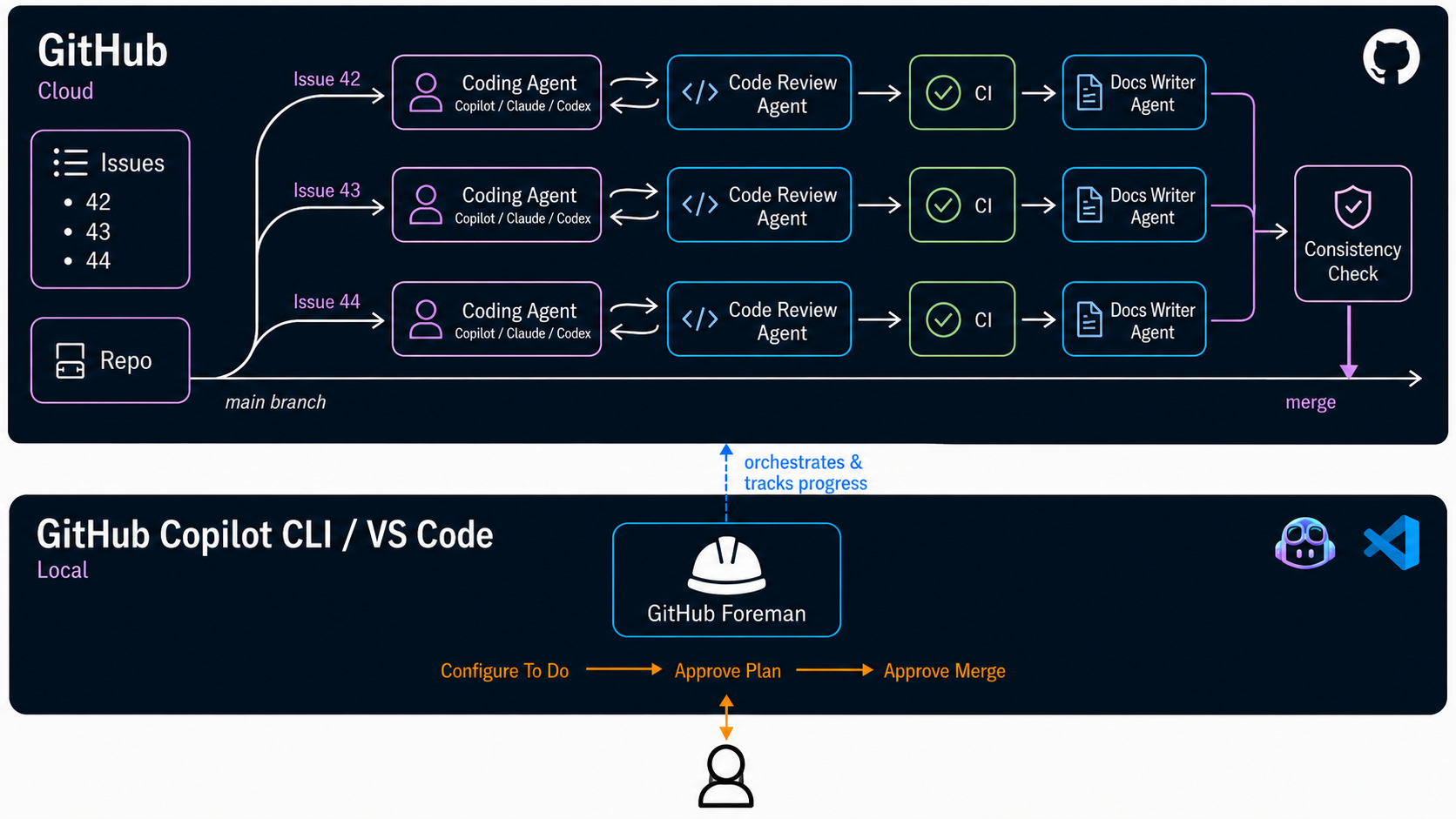
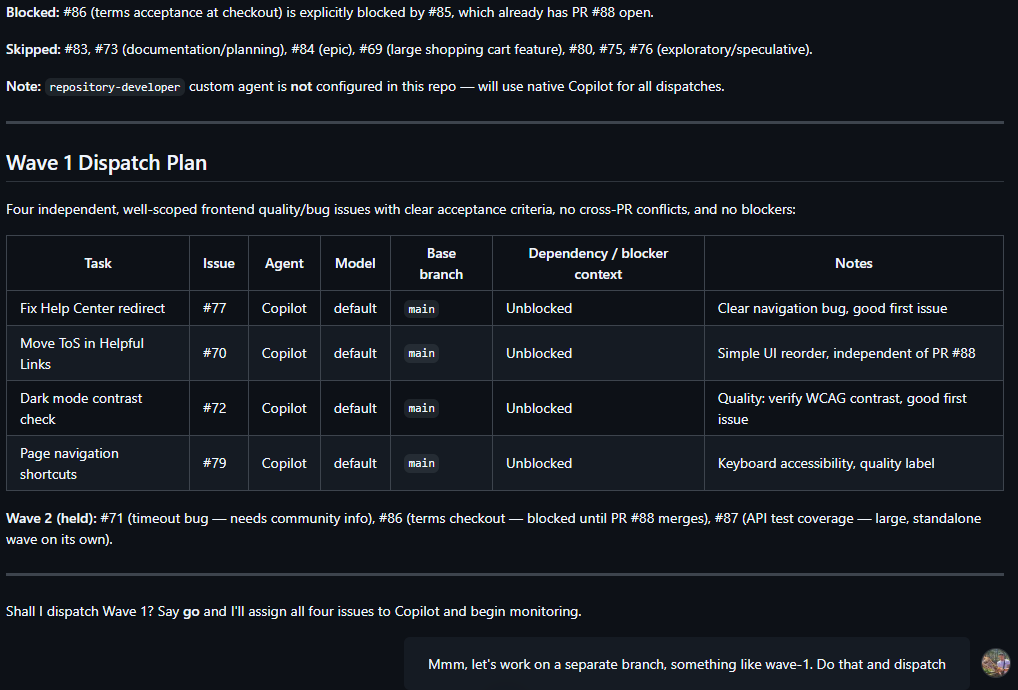
Instead of thinking about one agent and one prompt, Foreman thinks in waves:
- Read the repo state and open issues.
- Group work that can happen in parallel into a “Wave”.
- Pick the right coding agent for each issue.
- Monitor PR creation.
- Run review and CI loops.
- Check docs and cross-PR consistency.
- Stop at a human gate before merge.
The human interaction points are intentionally small, but important: approve the plan, and approve the merge. Everything in between can be coordinated. It’s basically a very GitHub-opinionated way of running an agent team, and they report to me!
Into the weeds
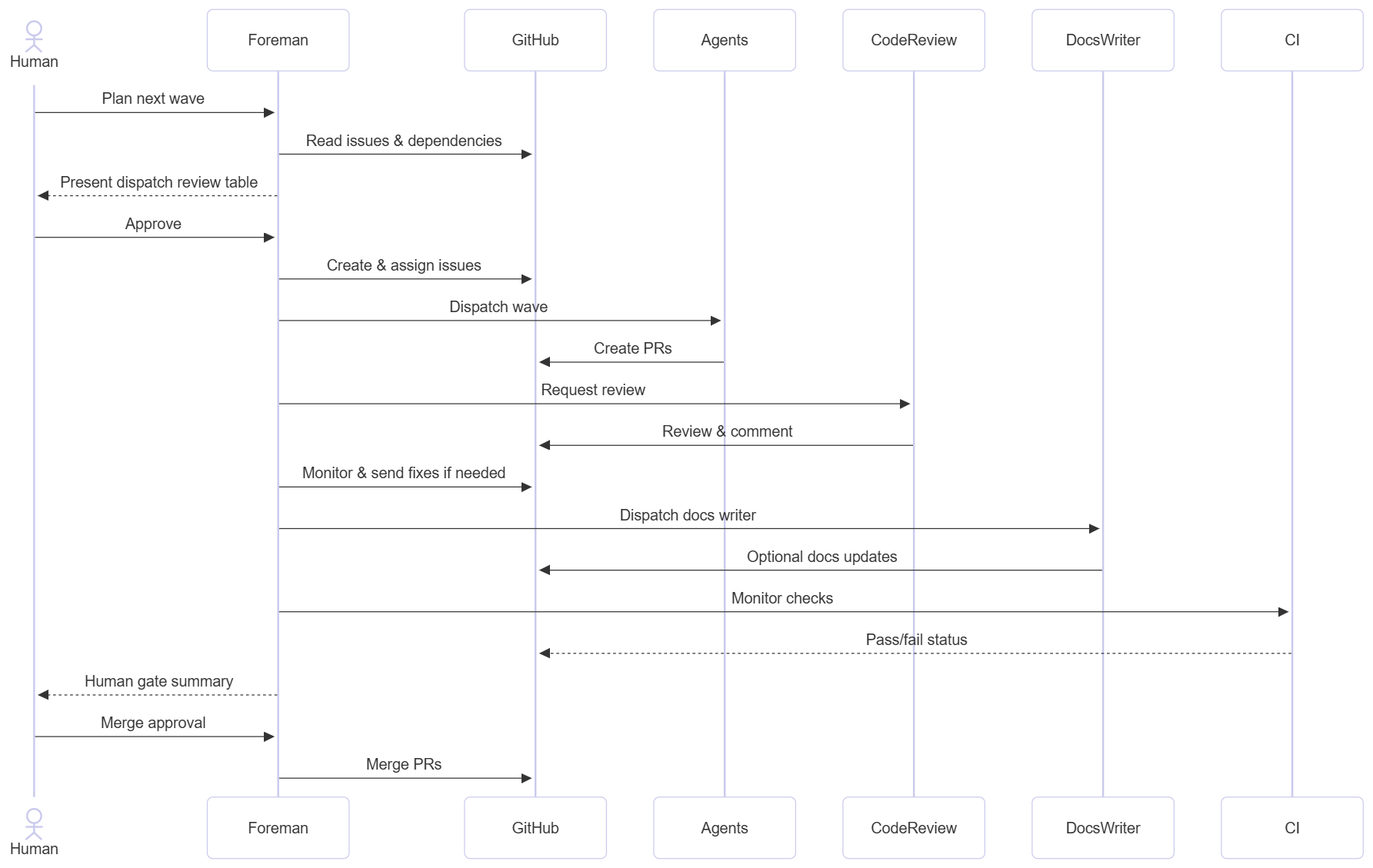
An important piece about Foreman is the review loop. Foreman kind of gets the cloud coding agent and the code review agent (both 1st party on GitHub) to talk to each other until they agree the code is ready to merge. After every commit to a PR, Foreman assigns the code review agent to it via the API or CLI, and once it finishes reviewing, that gets reported back to Foreman, which tells the coding agent to make changes. This keeps going until there are no more comments, at which stage it’s handed off to the docs agent to update the docs.
If you haven’t tried GitHub Copilot Rubber Duck, I think the idea once again is the same in spirit. With Rubber Duck, Copilot CLI pits the model that wrote the code (say GPT 5.5) against a model from another provider (say Opus 4.6). The team found early that this actually boosts quality as opposed to a same-model code/feedback loop. Model agnosticism, and in the future agent agnosticism, is an important piece that makes this possible. Don’t lock yourself into one model family.
So Rubber Duck does this locally and with two different models. With this Foreman workflow, we’re doing it with two different agents in the cloud. For quick synchronous development, where a human is guiding the agent, I think adversarial LLM review works because it’s quick and lightweight. The idea with custom agents could become: what if I wanted my code review agent to run specific regression tests, or give it access to its own separate tools with specific permissions? If we think of agentic SDLC in a team context, this starts to make sense at scale.
Foreman after all of this mixes in deterministic evaluation via CI. Tests, security scans, etc. Things that are already solved problems that we just integrate into the workflow, and Foreman checks to make sure these pass. If not, we go for another coding agent call.
We wrap up by updating documentation for each branch created, and then, importantly, a cross-PR check. I found while playing with it that letting these coding agents work in their own world sometimes creates cross-PR inconsistencies and definitely some merge conflicts, which I got Foreman to fix before bulk merging.
Stitching together this loop from scratch was fun, and relatively easy with Copilot. Nothing too magical!
How I came about it
One of the places this clicked for me was gh-devlake, a GitHub CLI extension for deploying and configuring Apache DevLake from the terminal.
gh-devlake was kind of ripe for this kind of workflow because CLI work tends to sprawl in predictable ways. A new capability is rarely just one code change. It usually means command wiring, shared helpers, help text, documentation, and making sure the overall command surface still feels coherent. Again, I could use Squad for this, which I did, but my second point started creeping up: I wanted to be able to step away without worrying about compute. Basically I wanted my agents to run in the cloud.
So I started slowly. First I just asked default Copilot to create me a bunch of tickets based on functionality, and assigned each to a cloud agent. I then realized my to-do list was basically issues, but some were dependent on others. It led me to this idea of grouping issues in waves, so I gave Copilot a specific skill to do that in my repo.
That skill turned into a custom agent when I told myself, “hey, I just really want to review this to do list before merging.. maybe tweak things a bit”. It wrapped up with me realizing assigning a task to an agent is not enough, I need to code review it, run CI, etc.
I slowly but steadily stepped back from the process, wanting this or that agent to do one of the things that was a chore, and sort of stitching them together.
Call it vibe coding or agent orchestration, but I don’t think this experience is unique, and my hypothesis is that we’ll see people and teams try to do this. Stepping back from the process, keeping ourselves as much out of the loop as possible, without sacrificing quality either. With Foreman I’m still very much in control, nothing gets merged without my approval. But I’m definitely less in the weeds.
As we move faster and faster, we become the bottleneck. This experiment just brings up a question we already have been asking: how much out of the loop can I put myself as a human? And what am I actually trying to achieve? Do I want to use GitHub, VS Code, Copilot, Claude, and all the cool features they have like /fleet or PRs, or am I more interested in the output of what I’m creating? It’s more the latter.
Managing my team on the go
The cherry on top is a feature people still aren’t very aware of: Copilot CLI’s remote access feature.
As mentioned, I wanted to run this and step away easily. I’d start a wave from Copilot CLI, use /remote, and then close my laptop and walk to work while it polled, monitoring it via the GitHub Mobile app on my phone. Nifty. Like Claude Dispatch or ChatGPT’s Codex integration.
This isn’t perfect though. A pain point for me is that GitHub Foreman executed on my CLI runtime, basically on my laptop. So being disconnected from the internet means my Foreman is paused. My agent team can still run in the cloud, but orchestration stops. The next stage of this is having an OpenClaw-like orchestrator, running in the cloud not just ephemerally but available to chat with. Keep an eye on what Microsoft is doing in this space with Project Lobster and some infra for GHCP agents as well.
Wrapping up + what does this all mean?
GitHub Foreman is a fun experiment, and it’s still very flaky. I’ve been trying to tweak the prompt, skills, etc. to make it work in a more consistent fashion. And my “keep the laptop open” problem still isn’t fully solved.
What I think it does more than anything, however, is point to a future of how we manage code and agent teams. Three main topics emerged for me in particular:
1 Human out of the Loop?
The above is clickbait. But I will call out a motivator I kept asking myself: How much can I step out of the loop as a human, while ensuring consistency? I realized I was actually just seeking a specific “output” for my code, and was less interested in the how, but I still wanted to reduce the amount of spaghetti code as much as possible.
The industry is experimenting and we’ll see this continue to evolve, but it’s clear teams of specialized agents are going to be important for your SDLC to accomplish this. In internal colleague discussions, ideas such as “Dark Software Factories” (similar to China’s “Dark Factories”) have come up, which I find interesting. There is certainly an industrial engineering aspect to this, although what remains primary is ownership and responsibility. I have a vested interest in being as far out of the loop as possible, but how much is acceptable? For a side project this Foreman workflow works. For an enterprise application where I have SLAs, complex architecture, and security concerns, I might still need someone paired with an agent who truly understands my application’s full context. I’d need people at these different stages in the loop.
I predict that audits and certifications like SOC and ISO will evolve to have a minimum requirement of human in the loop. As we architect these new “Software factories”, we’ll see how the industry evolves alongside the tech.
2 Agent Orchestration
Agent-to-agent collaboration is an interesting question that Foreman raises. I hacked my way around this, but what if I had a long-running coding agent that could interact with a long-running review agent? If you want an agent to critique another one and validate its work, what does that workflow look like, and how do you maximize quality while minimizing token usage? There are already protocols in this space like A2A.
Creating and customizing agents starts becoming a bottleneck too. I didn’t even touch on this here, but the next logical step after the agent team is: how can I distribute or share this agent team I’m creating? If I’ve set up a detailed review agent that has access to my JIRA, my regression test environment, and could one day even deploy to a dev subscription, how do I share this config across my organization? I have colleagues already working on this question via tools like APM.
3 User Experience, and what coding is starting to look like
Today, as a project lead, eng manager, or other role, I could communicate with my team on Slack or Teams about what needs to be done, answer clarifications, and brainstorm where I want the project to go. If we want to operationalize coding agents in a structured, organizational way, we have to think about the experience. This puts the following at the center:
- The interface: How easily accessible is my orchestration interface or partner? Can I do this work on the go?
- The team: Local vs. cloud will always be a debate, but cloud agents are very underrated. It makes sense that Claude, Codex, and Copilot CLI all started locally, because that’s typically how we’ve handled code and files. But the convenience of the cloud is undeniable and brings its own set of benefits (security, scalability, etc.)
The products that nail these experiences are going to push us into the next wave of agent-assisted coding, and work overall. We’ve seen the popularity of OpenClaw, which gives us that glimpse for more general-purpose use. What I can say is GitHub and Microsoft are cooking up some interesting stuff in this space as well.
Check out Foreman and file some tickets, I’ll group them into waves!